Here's a feature I can guarantee: once you start using it, you'll be spoiled for any long drive — and honestly for daily use too. Toyota's Dynamic Radar Cruise Control makes navigating longer trips easy with a set-it-and-forget-it cruise experience that's intuitive, convenient, and genuinely hard to go back from.
DRCC is a radar adaptive cruise control system that uses the preceding vehicle in front of you to maintain a preset following distance and cruising speed above 20 mph. Here's exactly how it works and how to use it.
- How Does Toyota Dynamic Radar Cruise Control Work?
- How to Use DRCC — Stem Control
- How to Use DRCC — Steering Wheel Button Control
- Additional DRCC Settings
- Full-Speed Range DRCC vs. Standard DRCC
- Benefits of Toyota Dynamic Radar Cruise Control
- Toyota Safety Sense 3.0
- Recap of Toyota DRCC
- Frequently Asked Questions
How Does Toyota Dynamic Radar Cruise Control Work?
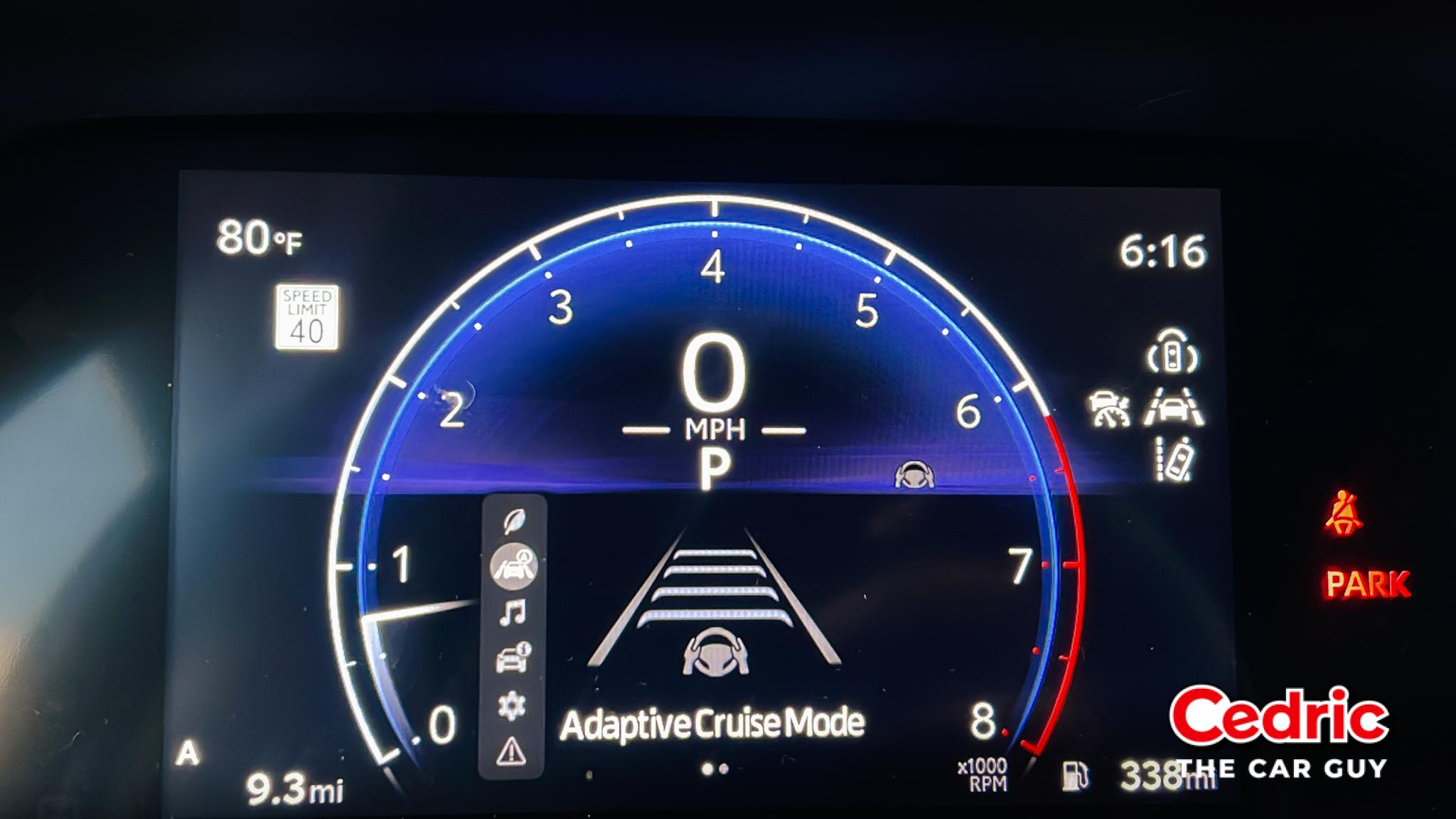
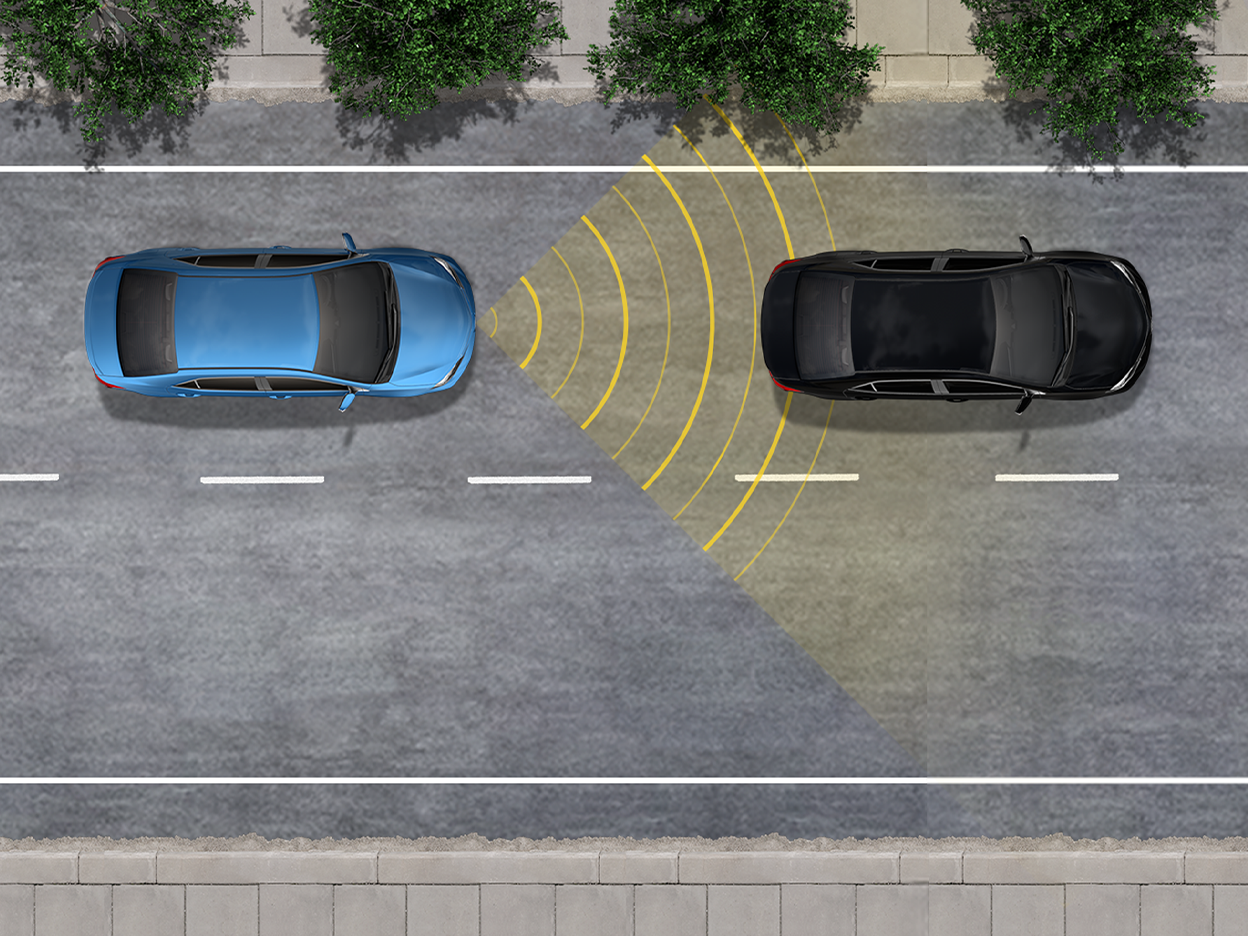
DRCC is an adaptive cruise control system that uses a millimeter wave radar to detect vehicles ahead. The system lets the driver select one of three or four preset following distances and cruise at a set speed above 20 mph — maintaining that gap automatically as traffic ahead speeds up or slows down.
On select Toyota vehicles, you can toggle between Standard Cruise Control mode and Dynamic Radar Cruise Control (adaptive) mode. The difference: standard cruise holds a fixed speed regardless of traffic ahead, while DRCC adjusts speed based on the vehicle in front of you.
Note: It is always the driver's responsibility to remain attentive. Never depend on the system entirely.
Honestly, Dynamic Radar Cruise Control is my favorite Toyota Safety Sense feature of all time. Every time I'm driving a customer's vehicle or a pre-owned car that has it — the moment I hit the highway, that system is going on. I set my speed right around 65 to 70, and I just let it do its thing while I stay focused on the road. No constant braking, no speeding up, no babysitting the throttle in traffic. Easy drive.
For context: I drive a 2011 Camry. The second I get back into my own car after dropping off a customer's vehicle, I have to do everything manually — and I feel every bit of the difference. That's what makes me appreciate DRCC the way I do. Once you've used it, you genuinely miss it when it's gone.
Get the Car Buying Secrets Guide — Free
Before you buy your next Toyota or any other vehicle, make sure you understand how the buying process works from the inside. Free PDF, instant download.
Download Free PDF →How to Use DRCC — Stem Control
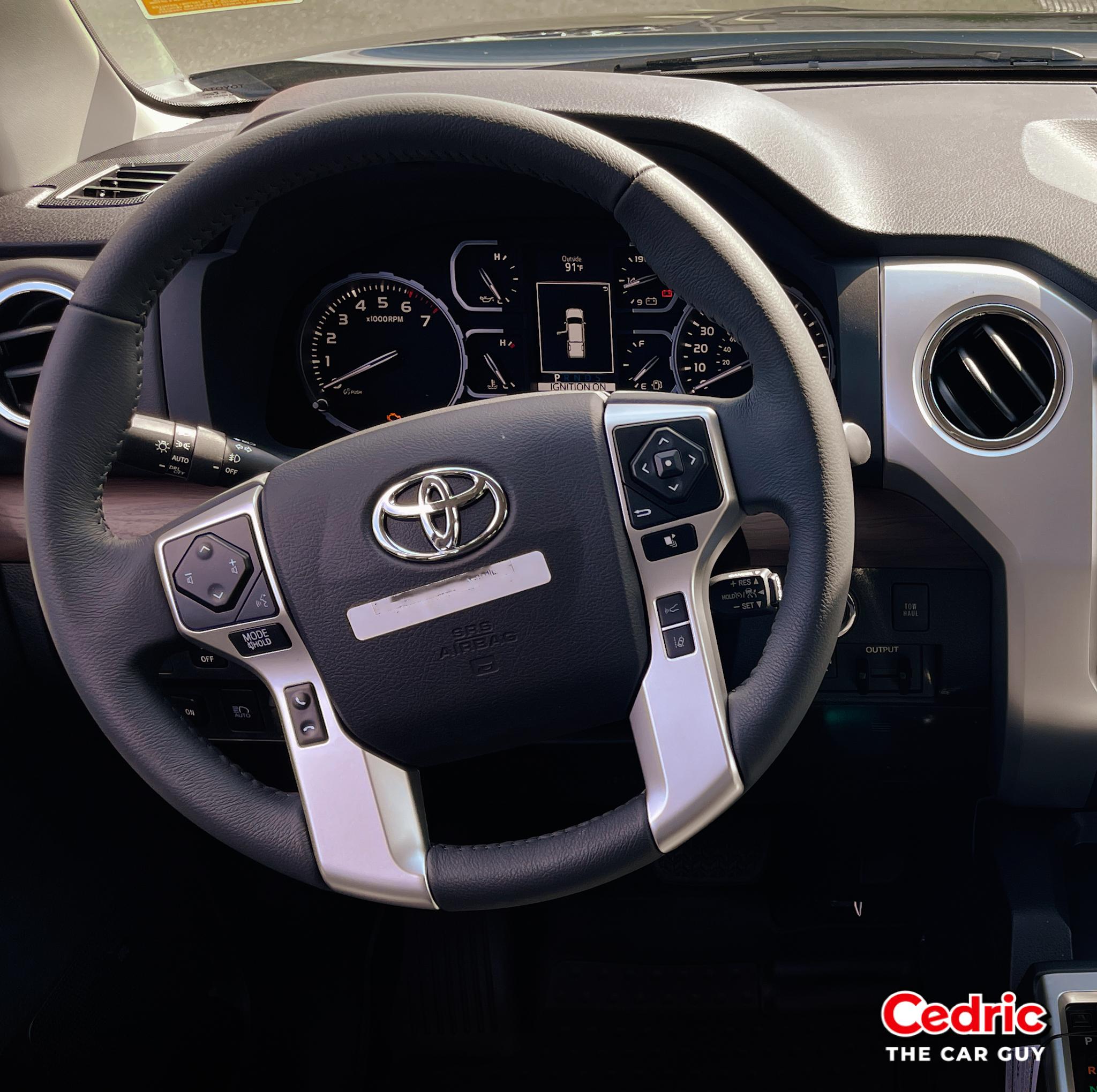
Some Toyota vehicles have cruise control on a stem mounted on the right side of the steering wheel with an on/off switch on the end of the stem.
- Press the button on the end of the stem to activate — the cruise control light should appear on the dashboard or MID.
- Reach your desired cruising speed, then press DOWN on the stem toward the floor to set it. By default, the vehicle will be set at the furthest following distance (3 or 4, depending on your vehicle).
- Use the distance button to adjust the following distance if you want to cruise closer to the vehicle ahead.
- Hold the stem UP to increase your set speed; hold it DOWN to decrease.
- Pull the stem toward you to cancel and enter coast mode, or press the brake pedal.
- To re-engage, pull the stem UP to resume and return to the previously set speed.
How to Use DRCC — Steering Wheel Button Control
Other Toyota vehicles have DRCC controls mounted directly on the right side of the steering wheel.
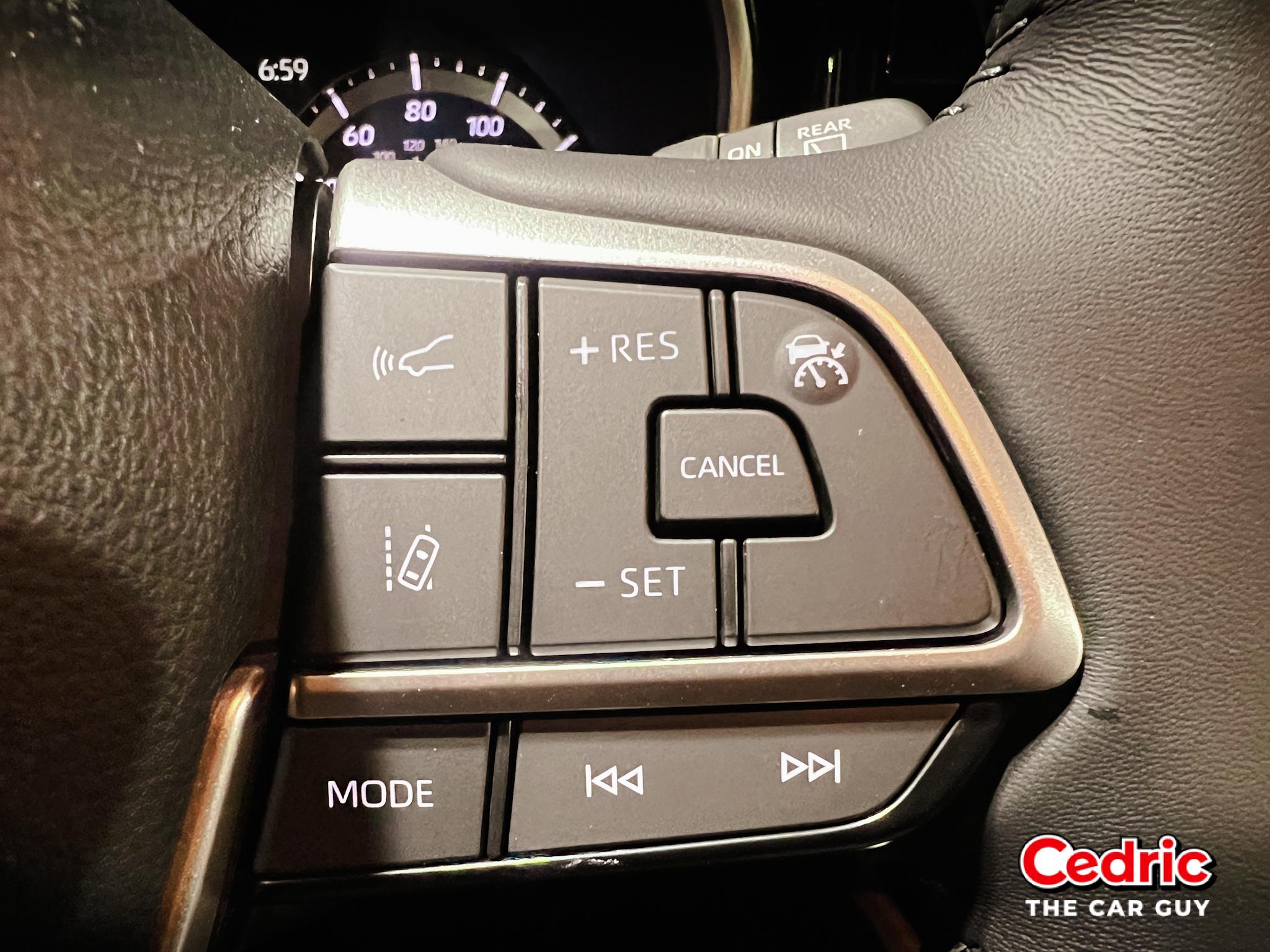
- Press the button with a speedometer icon and the word "mode" below it to toggle between standard Cruise Control and Adaptive Cruise Control. The MID will display which mode is active.
- Confirm the cruise control light stays illuminated to verify the system is active.
- Reach your desired speed and press the SET button — on some vehicles this appears as a car icon between lane markers with a speedometer below.
- Press the button with a car and three bars below it to toggle between preset following distances. Each press decreases the distance until it cycles back to the furthest setting.
- Use the +RES button to increase speed and the – button to decrease. One press adjusts by 1 mph; holding either button changes speed more rapidly.
- Press the cancel button or the brake pedal to enter coast mode and disengage cruise.
Additional DRCC Settings
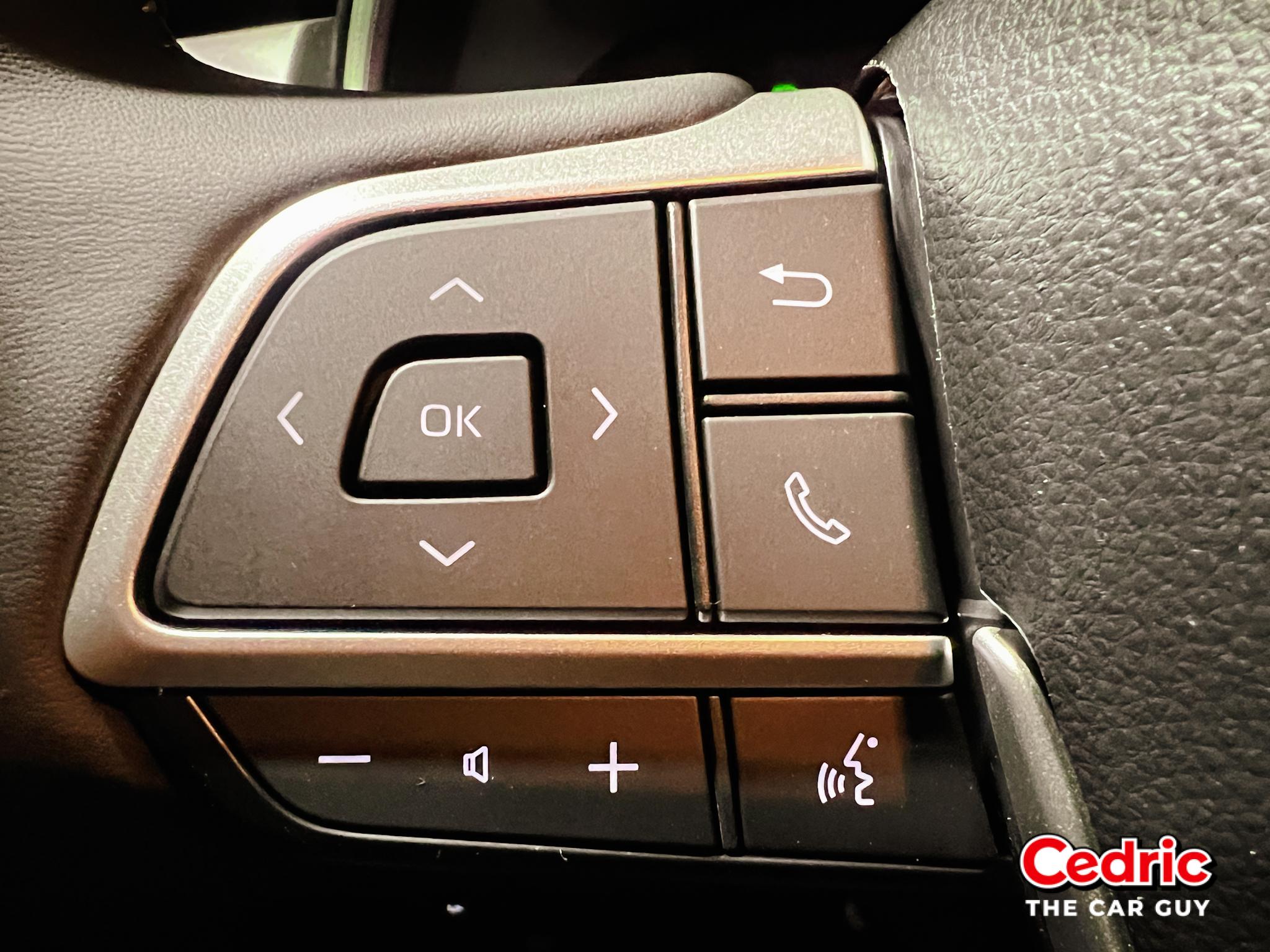
On select vehicles, fine-tune adjustments are available through the directional pad on the left side of the steering wheel.
- Use the directional pad to navigate to the Settings menu on the MID.
- Navigate to the DRCC settings.
- Adjust available options:
- Acceleration Setting — Choose your preferred rate of acceleration when the system resumes speed.
- Guide Message — Toggle on or off.
- Curve Speed Reduction — Off, Low, Mid, or High.
- Press the Back button to return to the previous menu.
Full-Speed Range DRCC vs. Standard DRCC
Full-Speed Range DRCC works with the Toyota Pre-Collision System to make driving in all traffic conditions more manageable. Unlike standard DRCC — which only operates above a certain speed — Full-Speed Range DRCC can slow the vehicle all the way to a complete stop and then resume automatically in stop-and-go traffic.
The system uses intuitive low-speed following and automatic braking to prevent collisions as traffic tightens, with alerts managed through the Pre-Collision System. It also offers improved vehicle detection for smoother, more natural speed adjustments — and adds a fourth preset following distance not available on standard DRCC.
Benefits of Toyota Dynamic Radar Cruise Control
- Reduced Driver Fatigue — Maintains speed and following distance automatically, letting drivers relax on long journeys without constantly adjusting throttle and brakes.
- Enhanced Safety — Automatically adjusts speed to maintain a safe following distance, reducing the risk of rear-end collisions.
- Adaptive Speed Control — Unlike standard cruise control, DRCC responds dynamically to traffic conditions ahead.
- Convenience — Adds genuine comfort to highway driving and stop-and-go traffic alike.
- Improved Fuel Efficiency — Smooth, consistent acceleration and deceleration patterns can improve fuel economy over time.
- Reduced Cognitive Load — The system handles speed maintenance and distance keeping, freeing the driver to focus on steering and road conditions.
- Ease of Use — Straightforward to engage and disengage, even for drivers new to adaptive cruise systems.
- Enhanced Confidence — An extra layer of safety support provides greater peace of mind, especially in challenging conditions.
- Future-Proof — As vehicle technology advances, DRCC is positioned to receive Over-The-Air updates and integrate with evolving systems.
- Integration With Other Safety Systems — Works alongside Lane Tracing Assist to help keep the vehicle centered in its lane even on bending roads, for a more complete assisted driving experience.
DRCC is incredible on long trips — but most people use it wrong. The biggest mistake I see is setting the following distance too close and trusting the system too much in heavy traffic. Use the longer following distance setting on the highway. Use Full-Speed Range DRCC in traffic. Always keep your foot close to the brake. And don't rely on DRCC in heavy rain or bad weather. DRCC is a driving assistant — not an autopilot.
Toyota Safety Sense 3.0
DRCC is part of Toyota Safety Sense 3.0 — now standard across the Toyota lineup. TSS 3.0 also adds Blind Spot Monitors with Rear Cross-Traffic Alert and Traffic Jam Assist for stop-and-go driving up to 25 mph. Here's the full suite:
- Automatic High Beams (AHB) — Automatically switches between high and low beams based on surrounding traffic conditions.
- Road Sign Assist (RSA) — Detects and displays road signs to keep the driver more aware of current speed limits and conditions.
- Lane Departure Alert (LDA) — Warns drivers of unintentional lane departure and may provide corrective steering assistance.
- Pre-Collision System (PCS) — Detects vehicles, pedestrians, cyclists, and motorcyclists, providing warnings and emergency braking if needed.
- Dynamic Radar Cruise Control (DRCC) — Maintains a set following distance from the vehicle ahead, automatically adjusting speed.
- Lane Tracing Assist (LTA) — Keeps the vehicle centered in its lane using lane markers and the vehicle ahead as reference points.
- Proactive Driving Assist (PDA) — Provides braking and steering support to maintain following distance and help stay within the lane.
Read more details on Toyota Safety Sense 3.0 →
The Car Buying Secrets Book — $19
Know your features, know your leverage. 25 years of dealer insider knowledge on how to evaluate a vehicle and walk out of any dealership with the deal you deserve.
Get the Book — $19 →Recap of Toyota DRCC
DRCC is genuinely one of the most practical driver-assist features in the Toyota Safety Sense lineup. Whether you're grinding through stop-and-go traffic or cruising a long highway stretch, it takes real pressure off the driver without asking anything complicated in return. Easy to set up, fully customizable, and useful every single day.
I personally use it to stay under the speed limit on longer drives — an extra layer of protection against a ticket that I appreciate more every time.
As always, DRCC is a complement to attentive driving — not a substitute. Stay focused on the road, keep your hands on the wheel, and be ready to take control at any moment.
Frequently Asked Questions
What is Dynamic Radar Cruise Control?
Dynamic Radar Cruise Control is an adaptive cruise control system that automatically adjusts your vehicle's speed to maintain a preset following distance from the car ahead, using a millimeter wave radar to continuously monitor traffic in front of you.
What is Full-Speed Range Dynamic Radar Cruise Control?
Full-Speed Range DRCC can slow the vehicle to a complete stop and automatically resume driving in stop-and-go traffic. Standard DRCC only operates above certain speeds, making Full-Speed Range significantly more capable in urban and highway traffic conditions.
How do you turn on Dynamic Radar Cruise Control?
Press the cruise control button on the steering wheel (either the mode toggle or the stem button), reach your desired speed, press SET, and use the distance control button to select your preferred following distance. The MID will confirm the system is active.
What does "Dynamic Radar Cruise Control Unavailable" mean?
This message typically appears when the radar sensor is blocked by dirt, bugs, heavy rain, or snow. Clean the Toyota emblem or the tinted panel in the front grille where the radar is located. If the message persists after cleaning, visit your local Toyota dealer.
Which Toyota models have Dynamic Radar Cruise Control?
Most Toyota vehicles equipped with Toyota Safety Sense include DRCC or Full-Speed Range DRCC as standard equipment. Check with your dealer to confirm which version is included on your specific model and trim.